Your brand. Their premium experience.
From the first enquiry to the final gallery, every step your clients touch carries your name — not ours. They select, approve and download in seconds. No accounts. No friction.
Free forever plan · No credit card · Your galleries stay private
Three steps. Zero confusion.
Designed so your clients glide through the process — and you spend zero time chasing them up.
Upload your gallery
Drag in your edited selects or push directly from Lightroom. Proofr organises them into a beautiful, fast-loading gallery automatically.
Share one link
Copy a unique link and send it however you like — email, WhatsApp, or your client portal. No passwords, no sign-up required on their end.
Receive selections
You're notified the moment they submit. A Lightroom collection is created instantly — images in the client's chosen order, sequence-numbered and ready.
Your complete studio, in one place.
Proofr is more than a proofing tool — it's the operating system for your photography business. Everything below lives under one calm, branded roof.
Projects
Track every shoot from first enquiry to final delivery. Lead → Quoted → Booked → Planning → Shoot → Culling → Retouching → Gallery → Completed.
Client CRM
Full client history, contact details, notes, and linked projects in one place.
Client Proofing
Share a private gallery link. Clients browse, select, and reorder — no account needed.
Final Galleries
Deliver your finished, edited photos in a stunning password-protected gallery.
Planning Boards
Shot lists, day timelines, kit checklists, location scouting and vendor contacts — all per shoot.
Quotations
Professional quotes with line items, tax, and deposit. Send, track, and convert to invoices.
Invoices
Track payments, outstanding balances, and deposit status. Everything linked to the project.
Moodboards
Build and share visual inspiration boards with clients before the shoot.
Contracts
Send contracts directly from the project. Keep everything signed and stored in one place.
Your whole studio, under your brand. Free to begin.
Built into your existing workflow.
The Proofr plugin lives in your Publish Services panel. Upload, track, and sync selections without touching a browser. It feels like Lightroom built it themselves.
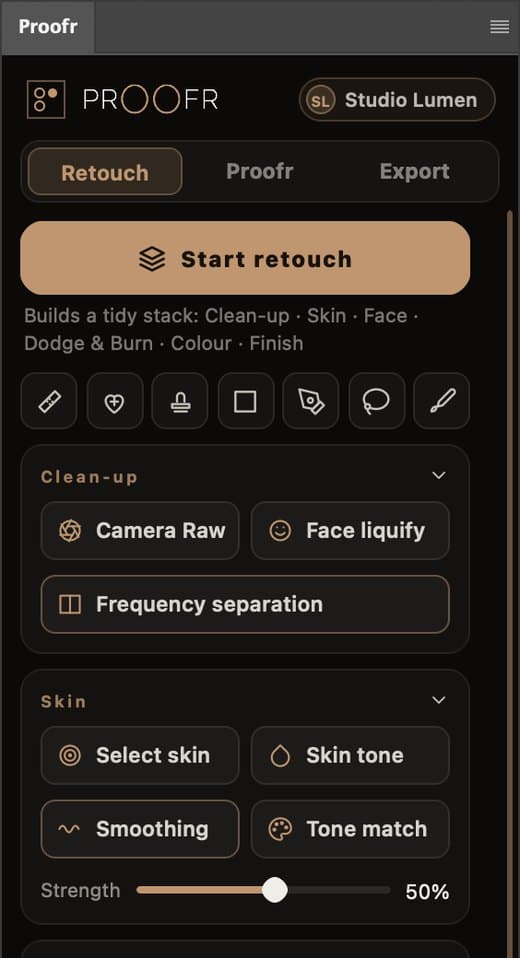
Retouch with the notes right beside you.
Proofr for Photoshop puts pro retouching tools and your Retouch Proof jobs in one panel. See what the photographer asked for, send fixes back and deliver the finals — without leaving Photoshop.
Included with Solo, Studio and Atelier · Photoshop 2024 or later, Mac and Windows
Up and running in 5 minutes.
Six steps from download to your first published gallery.
Download the plugin
Log in, then download the plugin from Settings — it's already linked to your account.
No license key to paste — just installUnzip the file
Double-click the downloaded zip. You'll see a folder called "ClientSelect.lrplugin" — keep it somewhere permanent like your Documents folder.
Don't move it after installingOpen Plug-in Manager
In Lightroom Classic, go to File → Plug-in Manager (Mac: Lightroom → Plug-in Manager). Click Add and navigate to the ClientSelect.lrplugin folder. Select it and click Add Plug-in.
Lightroom Classic only — not Lightroom CCActivate with your key
In Lightroom, go to Library → Plug-in Extras → Proofr Settings. Paste your PRF-XXXX license key and click Validate. The plugin activates immediately.
Same key you used to downloadAdd a Publish Service
A "Proofr" option now appears in your Publish Services panel on the left. Click Set Up, name your service, and hit Save. You're ready to publish galleries directly from Lightroom.
One service per photographerUpload your first gallery
Drag photos into your Publish Service collection, hit Publish. Proofr creates the gallery and gives you a share link — without leaving Lightroom.
Selections sync back automaticallyLightroom Classic required · macOS & Windows
Open the link. Pick your favourites. Done.
We obsessed over the client side so you don't have to field "how do I send you my picks?" ever again.
Zero friction
Clients open the link and start selecting immediately. No accounts, no app downloads, no passwords.
Works on any device
The gallery is fully responsive. Your clients can select from their phone at the wedding, or from their laptop at home.
Premium presentation
Full-screen, high-res previews with smooth transitions. Your brand front and centre — not ours.
Drag to reorder
Clients arrange their selections in preferred order before submitting. You receive them exactly that way.
Minimum selection guard
Set a minimum or exact number of selections required. Clients can't submit until the criteria is met.
Link expiry & limits
Set gallery expiry dates and view limits. Works for exclusive preview periods or time-limited offers.
Your couples' photos, kept safe.
Start free. Upgrade when it pays for itself.
No per-gallery fees. No client fees. No credit card to begin.
Go pro — premium delivery and your own brand, unlimited.
- Unlimited projects & galleries
- Premium story-delivery galleries
- Album proofing & 3D viewer
- Custom studio slug
- Lightroom plugin sync
- Proofr for Photoshop panel
- 250 GB storage
Run a studio — the live shoot dashboard, your domain and your team.
- Everything in Solo
- Live shoot view (flagship)
- Custom domain
- Branded email from your domain
- 2 photographer seats
- Advanced analytics
- 1 TB storage
For studios and agencies that want it fully white-labelled.
- Everything in Studio
- White-label (remove Proofr branding)
- 5 photographer seats
- 3 TB storage
Not ready to subscribe?
Start free, or pay only for the projects you take.
Try the full workflow with your first client. No card required.
- 1 active project
- 1 proofing gallery / month (50 photos)
- Quotations & invoices
- Client portal & PDF export
Full business suite for one project — no subscription.
- Unlimited quotes & invoices
- Agreements & e-signatures
- Standard delivery galleries
- Moodboards & planning tools
Compare all plans. Prices in USD, billed securely via Paddle. Cancel any time.
Answers before you ask.
Do my clients need an account to select their photos?
No. They open one link, tap their favourites, and submit. No login, no app, no friction — that is the whole point.
Is the Free plan really free?
Yes — free forever for your first client. You get 1 active project, 1 proofing gallery a month (up to 50 photos), and quotations and invoices. No credit card to start.
Does Proofr take a cut of my bookings or payments?
Never. You keep 100% of what you charge. Pricing is a flat plan only — you bring your own bank details or payment link, and clients pay you directly.
Can I use Proofr without Lightroom?
Yes. Upload galleries straight from your browser. The Lightroom plugin is optional — when you do use it, selections sync back into Lightroom in the exact order your client chose.
Are my galleries and my clients' data private?
Galleries are private by default. You can protect them with a PIN or password and set expiry dates, and each studio's data is fully isolated from every other.
What if I cancel?
Cancel any time from settings — no lock-in and no long contracts. You can downgrade to the Free plan and keep using the core workflow.
Still wondering something? Email us — a real person answers.